


Six months ago, I wrote about building an AI-ready design system . A component library structured so AI could actually understand it. The response split cleanly: designers were fascinated by the technical approach, engineers wanted proof it actually worked.
I’d been using the infrastructure myself for months. Every time I asked Claude to analyze my codebase, it found the right components. When I needed to refactor, it caught inconsistencies I’d missed. The system worked. I knew that from daily use.
But “it works for me” isn’t data. And without data, the harder question stayed unanswered: Does AI-ready infrastructure just make AI a better user of design systems, or does it enable something fundamentally different?
Turns out: both. And the difference matters.
I ran an experiment to quantify the first part (AI as user). Then the system did something unexpected . It started acting like a maintainer.
The experiment: can infrastructure beat prompting?
11 trials (5 Control + 6 Agentic DS) over 4 days. Same AI model (Claude Sonnet 4.5), same questions, same codebase. Only variable: whether the design system had machine-readable infrastructure.
Control group: No index files, no protocols. Claude Code had to explore the file system to find components (grep, bash, manual reads).
Agentic group: complete infrastructure (metadata, index, protocols). Claude Code could query the architecture directly.
Results weren’t subtle.
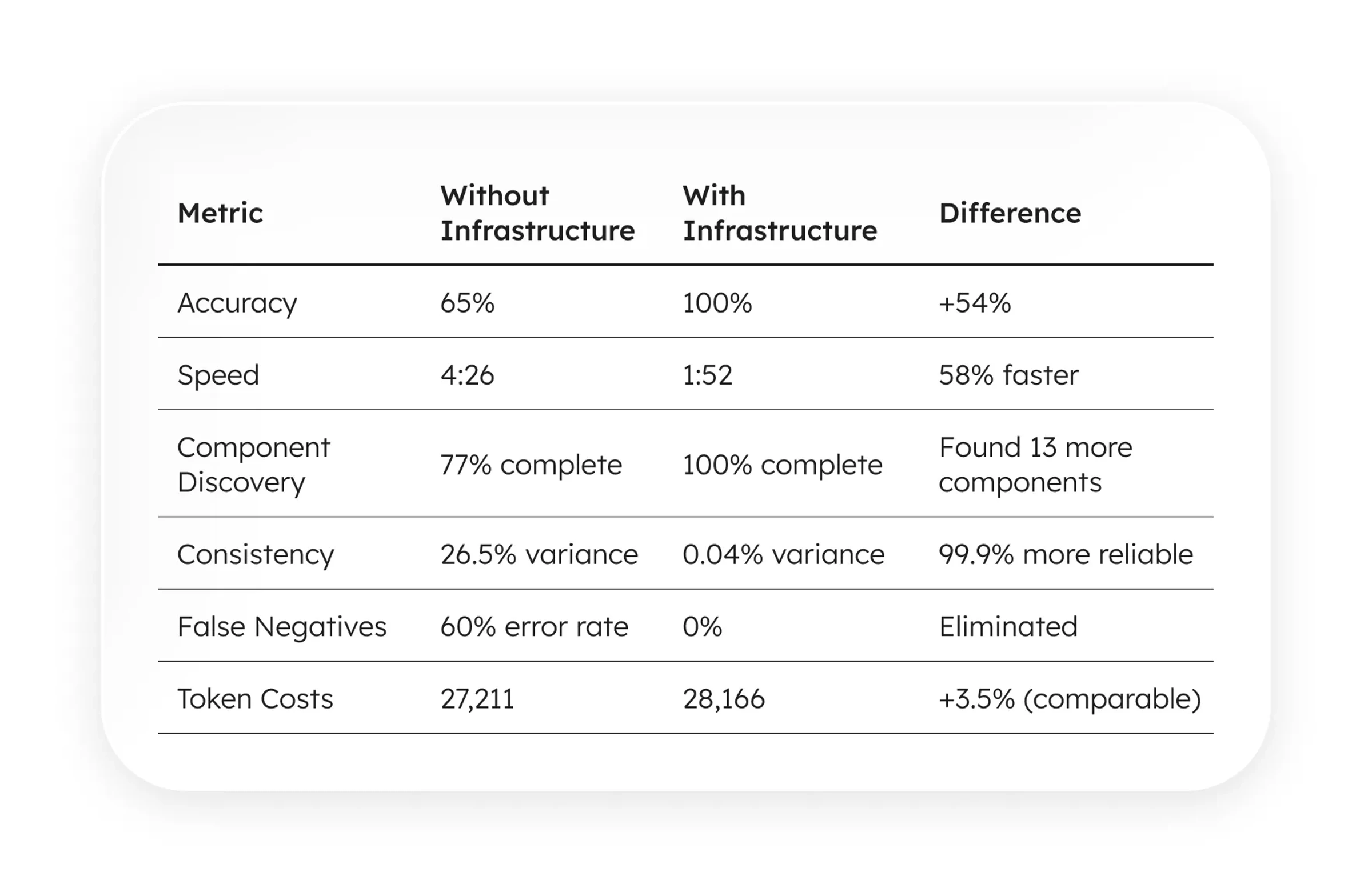
The architecture demonstrates measurable, reproducible advantages at comparable token cost:
All scores calculated from actual performance data using median of 6 Agentic trials (12,153 true work tokens) as baseline:
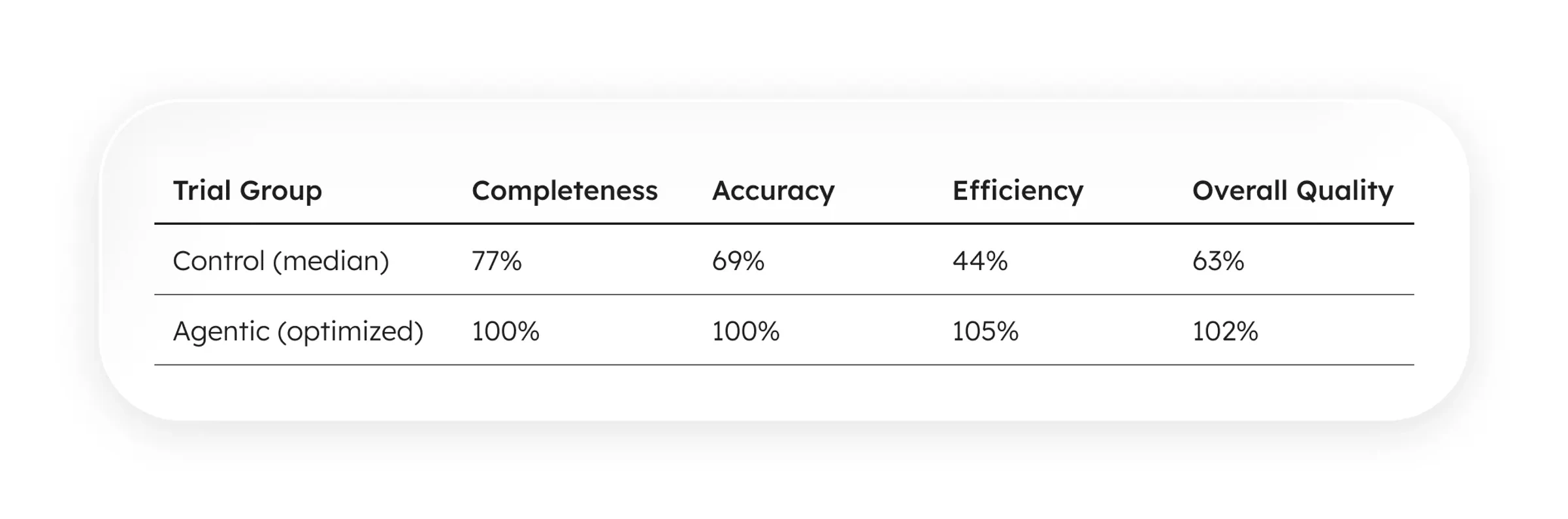
Same AI model. Same questions. Same codebase. The only variable: whether the design system had machine-readable infrastructure.
With infrastructure: 2x faster, 54% more accurate, zero false negatives. At basically the same token cost.
What infrastructure actually means
When I say “AI-ready infrastructure,” I don’t mean better documentation or clearer naming conventions. I mean treating your design system as a data structure that AI can query, not just text it has to interpret.
I will explain the structure in a following article, but I strongly suggest to read Intent-Driven Context for AI Design Systems by Diana Wolosin | Design Systems. Her article provides a timely theoretical parallel, articulating the very foundations of the approach.
Three pieces:
1. Component Metadata
Every component has a .metadata.ts file co-located with the code:
2. Codebase Index
A graph of all components and their relationships, in a token-efficient format (TOON offers 30–60% fewer tokens than JSON in some cases):
3. Query Protocols (CLAUDE.md)
Instructions that function as “system drivers,” teaching the AI how to read the index rather than guessing file paths.
That’s it. Metadata, index, protocols.
What happens when AI doesn’t have a map?
Without infrastructure, Claude Code had to explore. It globbed for files, read them one by one, and tried to mentally map imports across pages.
This took 4–5 minutes per question set. The methodology varied between trials (sometimes it used grep, sometimes bash find, sometimes manual file reading). Variance: 26.5%.
Worse: it missed components. Reported 43–44 components when 57 existed. Tagged Tooltip as "unused" when it was actively used. If you asked it to “find unused components and suggest removal,” it would recommend deleting active code.
But, when it does
With infrastructure, Claude Code simply read index.toon.
It answered the same questions in 1:52 instead of 4:26. It found all 57 components. It had zero false negatives. And most importantly, it had 0.04% variance across trials. The protocols converted chaotic exploration into deterministic analysis.
The unexpected benefit: self-analysis
The benchmark proved the infrastructure worked for querying. But I’d been using it for something else: having the system analyze itself.
Every few weeks, I’d ask Claude to generate an adoption report:
Cost: $0.20 in tokens.
The December report caught issues I had completely missed:
- ThoughtCard Duplication: It flagged that I had created a component but left raw markup duplicated in 2 files. I refactored it in an hour, eliminating 300 lines of code.
- Shadow DOM Pattern (
.pill-alt): It identified 14 instances of a CSS class that duplicated the functionality of myTagcomponent. It recognized this as technical debt. - Philosophy Gap: It flagged 22 “unused” components, mostly atoms like
SpacerorContainer. It revealed my actual coding preference for utility classes. The system used data to mirror my own architectural decisions back to me.
These weren’t just metrics. The system was reasoning about its own structure. It was doing the work of a Staff Engineer for the price of a gumball.
When does AI stop being a user?
A designer I know, Adrián Carranco, pushed back on calling this an “agentic design system.” His argument:
If the AI just consumes the design system like a developer would, why call it “agentic”? Aren’t you just describing a better-indexed component library?
It was a great question. Here’s the distinction:
- A User (human or AI) asks: “How do I use this component?”
- A Maintainer asks: “Should this component exist?”
A user reads documentation and implements. A maintainer audits structure, identifies debt, and enforces contracts.
The adoption reports cross that line. When the system told me “.pill-alt CSS classes duplicate Tag component functionality,” it wasn’t acting as a user. It was enforcing a design system contract I’d written but failed to follow.
The infrastructure makes both possible. The metadata files aren’t just documentation for AI to read. They’re contracts the AI can enforce.
Adrián asked:
“If tomorrow the agent stops being a consumer and starts modifying the system, does it become part of the ‘brain’?”
My answer: The .metadata files are the brain. They encode architecture decisions, usage patterns, and anti-patterns. The AI operationalizes that brain. Makes it active instead of passive.
When AI can detect drift, report it, and propose fixes, the system becomes self-governing. That’s when “agentic” stops being aspirational and becomes accurate.
What this means for design systems
Someone greps through the codebase, manually checks imports, create surveys for designers and developers, needs everyone aligned, writes a Google Doc with findings. It takes so much time and effort that translates to money.
With AI-ready infrastructure:
- Audit on demand: Run reports whenever you want, not once a quarter
- Cost: $0.20 per comprehensive analysis
- Consistency: Same methodology every time, no variance
- Depth: Catches patterns humans miss (Shadow DOM, unused dependencies, adoption trends)
The economics change completely. Governance shifts from “expensive tax we can’t afford” to “byproduct we get for almost free.”
The ARC protocol
The benchmark validated Phase 1. The adoption reports prove Phase 2. Phase 3 is where it gets interesting.
Phase 1: Audit (The Consumer)
Status: Proven. AI reads your design system with 100% accuracy and zero false negatives. The infrastructure converts chaotic exploration into deterministic queries.
Value: 2.5x speed, complete accuracy.
Phase 2: Report (The Maintainer)
Status: Validated. AI analyzes patterns, identifies technical debt, and suggests architectural improvements. It doesn’t just count; it reasons.
Value: Automated governance. Catching “Shadow DOM” patterns that rot codebases.
Phase 3: Compose (Self-Governing)
Status: The Future. AI detects drift, generates fixes, and maintains the system without manual intervention. When the report identifies drift, it doesn’t just flag it. It also creates the fix.
Value: Self-healing infrastructure.
At this point, we already have a lot of data mapped. It was super easy for Claude to generate a design system dashboard. A few hours of playing with D3js and got some very powerful graphs.
What’s next
I’m writing a series diving into each component:
- The ARC Protocol: How constraint-driven patterns eliminate false negatives
- Token efficiency: Why token costs matters for AI-ready infrastructure
- Metadata Design: What AI actually needs to understand your components
- Self-Healing Systems: The path from audit to compose to heal
The benchmark data is open. Same for the design system adoption report. The protocols and metadata patterns are in my repo. If you’re building AI-ready design systems, this is a starting point.
More soon